Submission of Inference Containers
Grand Challenge Algorithm Template
Algorithm submissions to the different phases of the LUNOVO26 challenge are to be made in the form of inference containers. Inference containers are equivalent to Grand Challenge (GC) algorithms. They are Docker containers that encapsulate trained AI algorithms (architecture + model weights) and all of the components needed to load a given case (e.g. low-dose chest CT + nodule locations and nodule types), generate predictions (e.g. lung nodule volumes, and store the corresponding output file(s) for evaluation.
The following code repository contains such example submissions. This repo includes a baseline algorithm (TotalSegmentator) that performs segmentation of nodules. You can use any of this repo (https://github.com/DIAGNijmegen/lunovo-baseline-public) as a template for your submission to the different phases of the LUNOVO26 challenge.
Before implementing your own algorithm using this templates, we recommend that you first upload a GC algorithm based on an unaltered template. In the following sections, we will provide a walkthrough of how to do this.
Installing Docker on Local System 🐳
You must have Docker installed and running on your system for the following steps to work. If you are using Windows, we recommend installing Windows Subsystem for Linux (WSL). For more details, please watch the official tutorial by Microsoft for installing WSL 2 with GPU support.
Building, Testing and Exporting Algorithm Container on Local System
Please use the shell scripts (.sh files) stated in all following commands. If you're using a Windows system, we highly recommend using Windows Linux Subsystem (WLS) with an Ubuntu distribution. We also highly recommend using Docker Desktop to manage your Docker containers and images. Please note that in order to build the baseline algorithm image using Ubuntu in WLS, you first need to enable integration with additional distros in Docker Desktop for Windows ( go to settings -> resources -> WSL integration). Alternatively, you could install the Docker Engine on Ubuntu following these installation steps.
Clone the template repo (see above) to your local system, with Git with LFS initialized (e.g. this can be done directly using GitHub Desktop). Build and test your inference Docker container by running do_test_run.sh. Testing will build the container and run it on images provided in the ./test/ folder. Export your container using do_save.sh. Once complete, your container image should be ready as a single .tar.gz file.
For more details, we highly recommend completing this general tutorial on creating GC algorithms: https://grand-challenge.org/documentation/create-your-own-algorithm/
Uploading Algorithm Container to Grand Challenge
To upload your algorithm container, navigate to Submit > Debug Phase and complete the form "on this page":
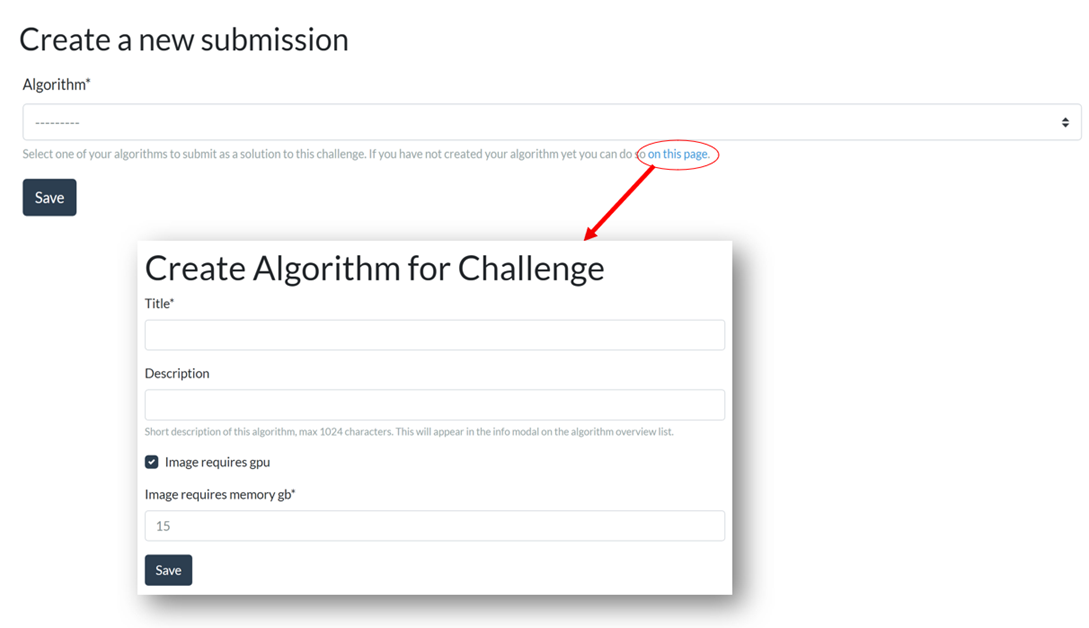
Once complete, click the "Save" button. At this point, your GC algorithm has been created and you are on its homepage. Now, click the "Containers" tab on the left panel, and then the "Upload a Container" button. Select your container image (.tar.gz file) for upload. After the upload is complete, click "Save". It typically takes 20-60 minutes till your container has been activated (depending on the size of your container). After its status is "Active", test out your container with a sample case.
To learn more about GC input/output interfaces, visit: https://grand-challenge.org/components/interfaces/algorithms/.
Create Containers for your own AI Algorithm
Following these same steps, you can easily encapsulate your own AI algorithm in an inference container by altering one of our provided baseline algorithm templates. You can implement your own solution by editing the functions in ./run.py. Any additional imported packages should be added to ./requirements.txt, and any additional files and folders should be explicitly copied through commands in ./Dockerfile. To update your algorithm, you can simply test and export your new Docker container, after which you can update the container image for the GC algorithm that you created on grand-challenge.org with the new one. Please note, that your container will not have access to the internet when they are executed on grand-challenge.org, so all necessary model weights and resources must be encapsulated in your container image apriori. You can test whether this is true locally using the --network=none option of docker run.
Submission to Phases
Once you have your trained AI model uploaded as a fully-functional GC algorithm, you're now ready to make submissions to the different phases of the challenge! Navigate to the "Debug Phase" page, select your algorithm, and click "Save" to submit. If there are no errors and evaluation has completed successfully, your score will be stored and sent to the organizers. The result will be published on the leaderboard according to the terms of the research agreement.
We look forward to your submissions to the LUNOVO26 challenge. All the best! 🍀